
Local News: Breaking & Latest
NEWSDELIVER LIMITEDNews & Magazines
4.48.12K Reviews
- Version
- 3.7.0
- Installs
- 5.00M
- Age Rating
- Everyone 10+
Screenshots


Our Review of Local News: Breaking & Latest
 Analysis by Appyee
Keeping up with local news can sometimes feel like a full-time job, especially when there’s so much happening around us. That’s where the Local News: Breaking & Latest app comes in. I decided to give it a whirl and see if it could really help me stay informed without feeling overwhelmed.
Choosing a starting point that fits your day
I find a local-news app most useful when I know what I need from it before opening it. On a quiet morning, I might want a quick sense of what is happening nearby; before heading out, I may care more about weather or an event that could affect my plans. This app is aimed at that everyday mix of local updates rather than at replacing a deep, single-topic research session.
It is a free news and magazines app from NEWSDELIVER LIMITED. Its average rating is 4.4 from around 37,000 ratings, and it has been installed over 5 million times. Those figures suggest it has found a substantial audience, though they do not tell me whether its coverage will match every neighborhood’s interests. Local relevance is personal: the same headline can be essential to one reader and peripheral to another.
If you mainly want a place to begin the day, the app’s combination of news, weather, and events is a practical fit. If you need a specialist source for business, sports, or national politics, I would keep that source too. A broad local feed is best treated as a convenient overview, not as a substitute for every outlet or for checking a consequential claim against its original reporting.
Getting Started with Local News: Breaking & Latest
As soon as I downloaded the app, I was greeted with a simple yet intuitive interface. It’s pretty straightforward, so you don’t have to be a tech genius to navigate it. Right off the bat, the app asks for your location to tailor content specifically for your area. I found this super handy as I could immediately dive into the news that truly mattered to me.
Features That Stand Out
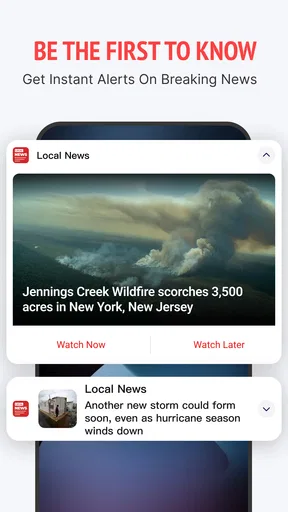
One of the coolest features is the real-time updates. I mean, who doesn’t want to be the first to know what’s going on in their neighborhood? The app sends notifications for breaking news, so you’re always in the loop. But don’t worry, it’s not overwhelming. You can customize the alerts to fit your preferences, ensuring you only get the notifications that matter most to you.
My practical advice is to treat alerts as a small handoff from the app to your attention, not as a complete account of an unfolding story. A notification can tell me that something has happened, but I still need to open the article and read the context before deciding what it means for my day. If I am in a meeting or commuting, I would rather let a less urgent alert wait than react to a headline alone. Customization helps make that choice manageable: keep the kinds of updates you genuinely act on and pare back the rest.
For example, imagine checking the app before leaving home and seeing a local update that could affect an errand. I can read the story, decide whether it changes my route or timing, and share it with someone who is meeting me. That is a more useful routine than checking every alert immediately. The key trade-off is that timely notifications are convenient, but frequent interruptions can make a news habit feel more stressful than informative.
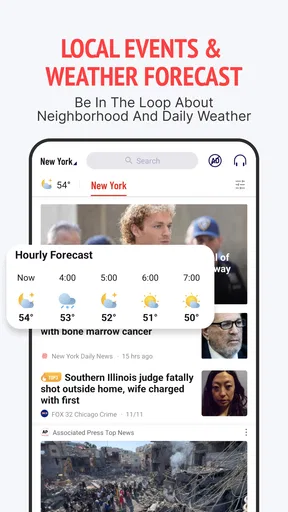
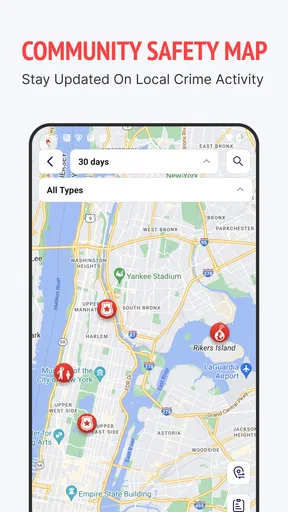
The app also offers a wide range of categories, from politics and sports to entertainment and weather. I loved being able to switch between different sections with just a tap. It’s like having a mini newsroom in your pocket! Plus, the inclusion of local events and happenings is a great touch for those of us who like to stay connected with the community.
Turning headlines into a useful routine
One workflow I like is to make two short visits rather than keep the app open in the background all day. I can scan the local feed when I have a natural pause, open only the stories that might change a decision, and leave lighter reading for later. This keeps breaking coverage, practical weather information, and community events from blending into one endless scroll.
Events are especially useful when I am deciding what to do nearby, but I would still check the relevant organizer’s information before setting out. A news app can help me discover that something is happening; the final details that matter to a visit—such as whether plans have changed—are worth confirming at the source. That extra step is not a flaw in this app so much as a sensible boundary between discovering an event and relying on its latest logistics.
Weather also has a different job from a full forecast service. Seeing it alongside local stories can help me notice the day’s conditions while catching up, but if I need precise planning for a trip or an outdoor commitment, I would compare it with a dedicated weather app. Keeping these roles clear makes this app more useful: it provides a convenient local overview, while specialist tools handle decisions that demand more depth.
User Experience
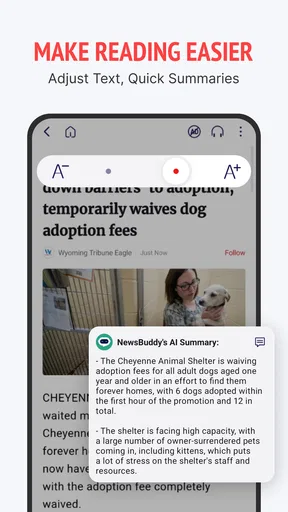
Now, let’s talk about the user experience. The app runs smoothly without any annoying lagging, which is a huge plus in my book. The articles are easy to read, with clear fonts and neat layouts. And if you’re like me and love to share interesting stories, the app makes it super easy to share articles directly to your social media or via email.
Sharing is a handoff too. When a story affects a household plan or gives a useful local update, sending it to the person who needs it can be more valuable than simply bookmarking it for myself. I would include a sentence about why I am sharing it, rather than assume a headline tells the whole story. The recipient can then decide whether to read it, while I avoid turning a quick link into an unsupported claim.
Compared with checking several local outlets one by one, a single app can make discovery feel less scattered. The trade-off is that a compact feed cannot offer the same editorial depth or perspective as reading a particular newsroom directly. If I am investigating a complicated council decision or want a strong range of viewpoints, I would go beyond the feed and read more than one report. For a quick scan of what may matter close to home, the simpler route is often enough.
There is also a useful distinction between saving an article and treating it as a permanent reference. A saved story gives me a way to return when I have time, but for an urgent matter I would not rely on memory or assume that an older article contains the latest development. I would reopen it, check its context, and look for a newer update before acting. That small habit helps keep convenience from turning into stale information.
One thing I particularly appreciated was the ability to save articles for later. Sometimes life gets busy, and it’s nice to have the option to catch up on important news when you have more time.
Who will get the most from it—and where it falls short
I would recommend this app to someone who wants a low-effort way to keep local stories, events, and weather in the same general routine. It suits a reader who checks headlines in brief gaps, shares useful items with family or friends, and prefers a straightforward interface over managing a collection of separate sources. It can also be a handy starting point for someone who has recently moved and wants to pay more attention to what is happening around their new area.
I would be more cautious if you expect every alert to be essential, want extensive controls over the composition of your feed, or need a particular publication’s reporting and analysis. Notification preferences can reduce unwanted interruptions, but they do not remove the need to choose what deserves your attention. Readers who already follow trusted local outlets closely may find this most valuable as a secondary discovery tool rather than as their main news source.
The app is free to download, with in-app purchases ranging from $1.99 to $39.99 per item. I would look at any purchase details carefully before confirming one and decide whether the paid option addresses a real need for me. Its age rating is Everyone 10+, which is useful context for households considering the app, but adults should still use their own judgment about what news content is appropriate for younger readers.
It was released on August 24, 2023, and version 2.27.1 requires Android 8.0 or later. Before installing, I would check that my device meets that requirement. These practical details matter most when an older phone is involved; otherwise, the decision is less about technical setup and more about whether a local overview suits the way I like to read.
Final Thoughts
Overall, the Local News: Breaking & Latest app is a solid choice for anyone wanting to stay updated with the latest happenings in their area. It’s user-friendly, customizable, and packed with features that make following the news a breeze. Whether you’re a news junkie or just someone who likes to keep an eye on the local scene, this app has something for everyone. So why not give it a try and stay informed effortlessly?
My recommendation comes with one qualification: I would use it as a convenient local front door, then follow through to a fuller source whenever a story could affect an important decision. That balance makes the app easier to fit into ordinary life without asking it to do the job of a specialist outlet, a detailed forecast, or direct event information. If that is the kind of help you want from a news app, it is worth trying; if you need depth above all, a more focused source will serve you better.
Privacy and Permissions
See what permissions an app requests and how it handles your data.
- Location
- approximate location (network-based)
- Photos/Media/Files
- read the contents of your USB storage, modify or delete the contents of your USB storage
- Storage
- read the contents of your USB storage, modify or delete the contents of your USB storage
- Camera
- take pictures and videos
- Wi-Fi connection information
- view Wi-Fi connections
- Other
- view network connections, disable your screen lock, control flashlight, full network access, reorder running apps, draw over other apps, control vibration, prevent device from sleeping, Google Play license check, read Google service configuration
Verdict
Strengths of Local News: Breaking & Latest
- Timely updates on local events.
- Customizable notification settings.
- User-friendly interface design.
- Access to multiple news sources.
- Offline reading mode available.
Limitations of Local News: Breaking & Latest
- Limited international news coverage.
- Occasional ad interruptions.
- Some articles require subscription.
- Minor bugs in search function.
- Frequent app updates needed.
Other Releases by NEWSDELIVER LIMITED
View All
WeatherNews: Local & Breaking
News & Magazines4.4
Similar Picks in This Category
View All
Google News - Daily Headlines
Google LLC4.0

X
X Corp.4.8

Flipboard:Your Social Magazine
Flipboard3.4

Opera News: breaking & local
Opera4.5

Hindi News by Dainik Bhaskar
Dainik Bhaskar Group4.0

Way2News Daily News App
Way2News ( Formerly Way2SMS )4.6
Frequently Asked Questions
What features does the Local News app offer?
The Local News app provides a variety of features to keep users informed about their surroundings. It covers breaking news, weather updates, traffic reports, and local events. The app also offers customizable alerts, allowing users to receive notifications on topics of interest. Additionally, it supports personalized news feeds based on location and preferences.
Is the Local News app available for both Android and iOS devices?
Yes, the Local News app is available for download on both Android and iOS platforms. Users can find it on the Google Play Store for Android devices and the Apple App Store for iOS devices. The app is designed to provide a seamless experience across different operating systems, ensuring all users have access to the latest updates.
Does the Local News app require a subscription or payment?
The Local News app is generally available for free, offering access to a wide range of basic features. However, it may include in-app purchases or subscription options for premium content or ad-free experiences. Users can choose to upgrade based on their needs and preferences, ensuring flexibility in how they consume news.
How does the Local News app ensure accurate and timely information?
The Local News app partners with reputable news sources and local journalists to deliver accurate and timely information. It employs a rigorous vetting process to verify stories before publishing. Additionally, the app uses real-time updates to ensure users receive the most current information, making it a reliable source for local news.
Can I customize the types of news I receive in the Local News app?
Yes, the Local News app offers extensive customization options to tailor your news feed. Users can select topics of interest, such as politics, sports, or entertainment, and choose specific localities to follow. This feature ensures that the news delivered is relevant and aligns with individual preferences, enhancing the user experience.
